


Patterns
Help users to…
Check personal information
Also known as: Authenticated info list
Use with caution: Available- Contributors
- Shawna Hein
- Kevin Stachura
Purpose
The purpose of this pattern is:
- To create an easily scannable list / group of a user’s related items
- To consolidate the page layout and remove the sidebar, so as to reduce page scanning
- To maintain consistency with mobile layout patterns
- To give the user a quick way to ‘jump’ to desired content
Example
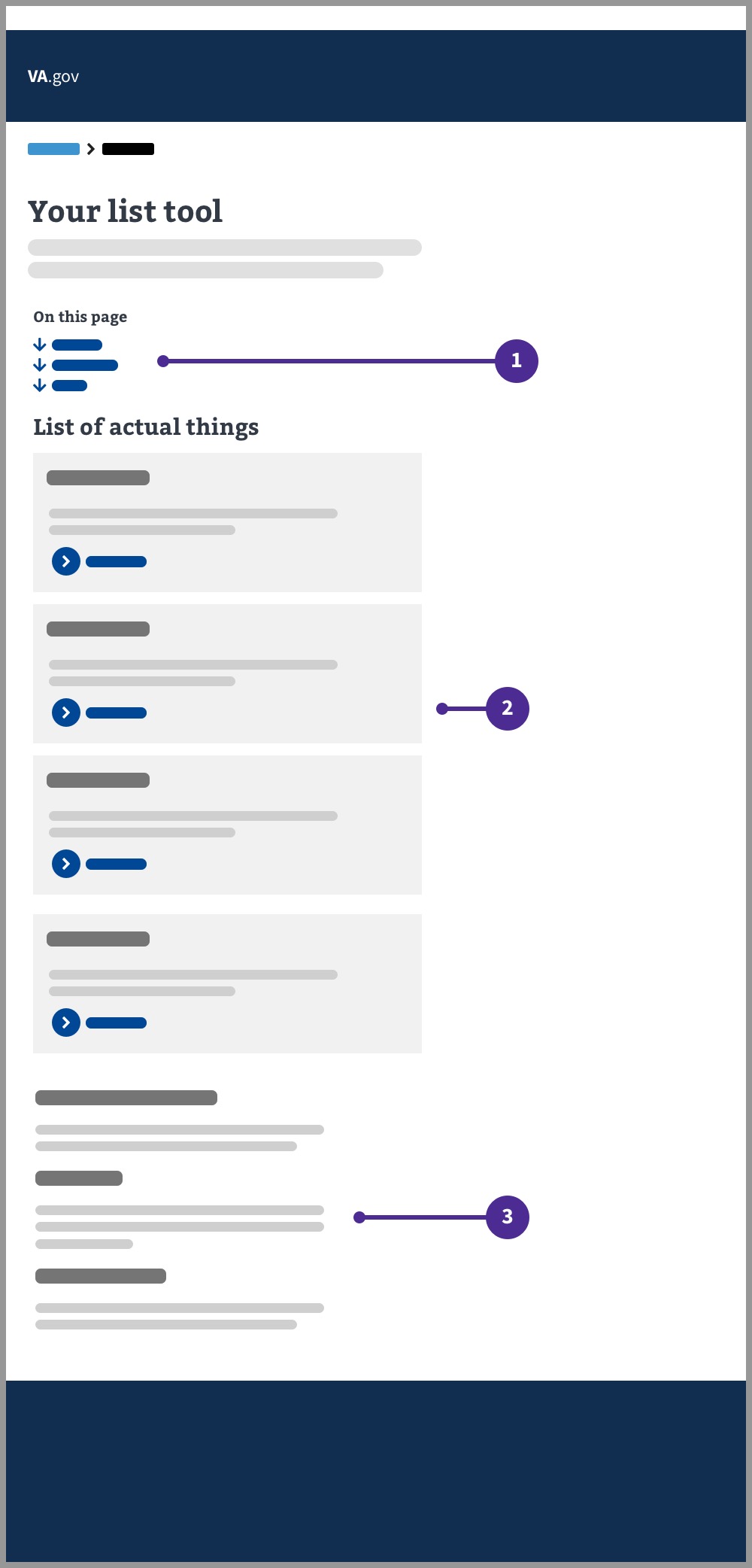
- ‘On this page’ component. This section should link to the associated content on the page. It should ‘jump’ to that section when the user clicks it.
- User’s list of items. A group of related (and relevant) content items for the user to review.
- Additional information. Relevant but potentially tertiary information for the user. Not part of the user’s list of items. The ‘on this page’ component will link to these items.
Layout
Typical layout
Check your claim, decision review, or appeal status
Your claims, decision reviews, or appeals
We sometimes combine claims to make them easier to process. If we've combined your claims, you'll see them listed together here.
Showing 1 – 10 of 50 events
Claim for compensation
Received on March 11, 2023Step 3 of 5: Evidence gathering, review, and decision
Moved to this step on June 21, 2024
An item in the claim needs your attention
Claim for compensation
Received on August 6, 2024Step 3 of 8: Evidence gathering
Moved to this step on August 6, 2024
Claim for compensation
Received on August 5, 2024Step 3 of 8: Evidence gathering
Moved to this step on August 6, 2024
Claim for compensation
Received on June 25, 2024Step 1 of 8: Claim received
Moved to this step on June 25, 2024
Your claim letters
You can download your decision letters online. You can also get other letters related to your claims.
Additional services
What if I don't see my appeal?
If you submitted a Notice of Disagreement for an appeal within the last 3 months, VA might still be processing your appeal. For more information, contact your Veterans Service Organization or representative.
Need help?
Call us at
Layout with consolidated additional information (FAQs section)
Same "Your claims, decision reviews, or appeals" list as above, with the "What if I don't see my appeal?" section and a consolidated FAQ section in place of separate additional-info sections:
What if I don't see my appeal?
If you submitted a Notice of Disagreement for an appeal within the last 3 months, VA might still be processing your appeal. For more information, contact your Veterans Service Organization or representative.
FAQ about my appeal
How long does an appeal take?
Typical appeals usually take 130 to 160 business days depending on the type of appeal you request and whether we need more evidence to make a decision.
What if my appeal is denied?
If your appeal has been denied you have 90 days to request another review. Your decision letter will explain your options.
What should I do while I wait for my appeal?
If you need medical assistance or other outpatient care while you wait, you can still get care at your local VA medical center.
What if I am having trouble filling out my appeal?
You can get help from an accredited representative, like a Veterans Service Organization (VSO), attorney, or claims agent. VSOs offer help for free.
Need help?
Call us at
Usage
You should use this pattern if you’re designing an experience where a Veteran is viewing a list of items relevant to them. For example, a list of the claims they have in process, a list of their disability ratings, or a list of the medical devices they have ordered.
Additional notes
When to consider something else
- If you’re designing a list of things embedded in a form, this may not be the best pattern.
- If you’re designing a list with complex filtering and sorting needs, this pattern is probably too simple and you may want to go with patterns more similar to other search tools on our site.
The ‘on this page’ component and headings
The on this page component should start with a link to the list itself, and then list frequently asked questions or other important content topic areas. If there are more than 4 top questions or content topics, you can collapse the questions down to a single H2 “FAQ” in the “on this page component”, as seen in the second design mockup with “FAQ about apple trees.”
Integrating contextual questions in the cards
Overall questions should be in a content area accessed by the “on this page” component, but more contextual questions can be “additional info” components on the cards themselves. Example provided.
Claim for compensation
Received on May 15, 2023Step 3 of 5: Evidence gathering, review, and decision
Moved to this step on June 21, 2024
An item in the claim needs your attention
Items on the card and optional card elements
Make sure to not overload elements on the cards. If you’re finding you need to let the user know about a fair amount of information about a single card, link to a details page with more detail.
Try to stick to only a single item (or less) of each element type - e.g. one status, one Details component (with the exception of name:value pairs).
And of course, not all the elements you see in this design are necessary, for example, if you don’t have detail pages for your items, you can leave out the action link and still use this pattern.
Accessibility considerations
Always be sure to include an a11y specialist in any authenticated info list pattern you’re developing.
Action links
The designs provided above leverage action links as an example for the list cards. Consider whether an action link or a default link is more appropriate for your use case. Please follow the guidance provided on the action link page of the design system.
Still not sure which is best for your use case? Our accessibility team held a presentation on Buttons vs. Links, which is a great reference to help you decide.
Research
Research for this layout was conducted via the Debt Letters MVP Usability Test and proved favorable among veterans.